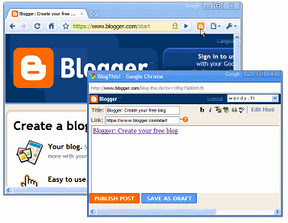
Once you add the BlogThis! button to your browser toolbar, blogging will be a snap (or rather, a click). Click the button to open Blogger in a new application window. The new post is pre-populated with a link to the web page you're on, as well as any text you've highlighted on that page. Edit the post to your liking and post it instantly to your blog!

Updates
Version (0.1.0): Fixed issue where Chrome's pop up blocker prevented the extension from functioning. Added support for special characters in blog post

Version (0.1.1): Blog this icon had turned unresponsive due to a bug. The same has been fixed in this release of extension.

Version (0.2): Added 'via Blog this' link at the end of each post.

By installing this extension, you agree to the Terms of Service at https://chrome.google.com/extensions/intl/en/gallery_tos.html
Showing posts with label blogging. Show all posts
Showing posts with label blogging. Show all posts
Monday, December 12, 2011
Adds a BlogThis! button to the browser toolbar, which lets you post to your Blogger blog from any webpage with just one click.

Monday, November 28, 2011
Official Blogger Template Designer Now Available
Official Blogger Template Designer Now Available
Earlier Google had launched the Blogger Template designer as an experimental feature in March 2010. But now the template designer is out of in-draft experimental section as Google has released this much awaited Blogger Template designer to everyone. This will give the bloggers ample scope to play with their blogger templates and get the perfect look on their blogs.


Earlier Google had launched the Blogger Template designer as an experimental feature in March 2010. But now the template designer is out of in-draft experimental section as Google has released this much awaited Blogger Template designer to everyone. This will give the bloggers ample scope to play with their blogger templates and get the perfect look on their blogs.
Using Blogger Template designer you can customize the design and look of your blog. This also eliminates the requirement of having any HTML or CSS knowledge. It has got it’s own a pre-defined templates, images, colors, column layouts, and more.
If you are blogging at Blogger platform, sign in to your profile now and you will see a “New! Template Designer” notification. Else you can head to “Design” menu and then select Template Designer.
Below is a video that explains how Blogger Template Designer can help you to customize the look of your blog.
Get a Free SEO Report for Your Website Or Blog
Get a Free SEO Report for Your Website Or Blog


Do you have your own Website? or Do you have several Blogs? Then, where do you find your Blog or Website among millions of websites or blogs existed? Nowadays domain registration and web hosting is so cheap that anyone can afford it easily. But making Website and running it – are two different things, and yes! – It isn’t compulsory to have a website to know how to run it effectively. But let me tell you, someone can help you on this! Well, go through this article completely, and you will able to know – What aspects are required to follow while running a website, and who can help you to generate Free SEO report for your Website or Blog.
Different Aspects while running a Website or Blog:
Well, the aspects are over all everything like – your page design, contents, images, your regular updates and the most import – the PROMOTION. even you may ignore all these above things but you can’t ignore the promotion part.
The promotion is mainly depends SEM which stands for Search Engine Marketing and SEO(Search Engine Optimization) plays an important role within it. Well, it is a vast concept to explain all, but you can search and collect all the information on this which is plenty available on Internet.
Lets go through a short Summery -
Many people think they’ve finished their web Design,uploaded their Files, and setup their Blogs, but they still not get as many visitors as they hoped for! Because they haven’t started working on one of the most important ways to market their site – that is SEO (Search Engine Optimization). But if you focus on SEO, then it will definitely help you to discover your content on the internet and to gain traffic for your blog.
Who can Help you on SEO?
There several SEO companies are present to help you, you can consult them and take help regarding on your Website for Search Engine Marketing help. There many companies are providing SEO services for which you may have to pay for their services.
Why Pay money for SEO Report?
Many SEO companies take money for SEO reports to let you to know – What are the things you lack on your website for making Search Engine to understand and to give priority to your Website or Blog. And also give reports on – How to make your Website or Blog convenient towards Search Engine so that, it will take your Website or Blog to consideration and give you the first priority on SERPs (Search Engine Ranking Point).
But, why pay them! while you are getting all these information for FREE. Well, yes! Let me tell you How to get a free SEO report for your website or blog.
SEOrush
SEOrush is a site that helps you to get Free SEO report for your website or blog. The reports include On Page SEO and Off Page SEO as well as social presence, indexed pages, validation, meta information, various ranks and standard domain information.
How to get a free SEO report for your website or blog?
- Enter website URL for which you want to get free SEO report in the search box at the top right hand side of the website
- And click on Go button
Well, that is the all you have to do, It will load all the information such as – domain owner, whois, website creation date, number of pages indexed, validation, meta, pagerank and traffic data, W3C errors(if any), social resources, site links etc.
If you have come as far on Blogging, then i am sure SEOrush will help you to get an idea about the areas you are doing well and where you need improvement.
Reduce Bounce Rate Of Your Website Or Blog (8 Proven Tips)
Reduce Bounce Rate Of Your Website Or Blog (8 Proven Tips)


It is very important to reduce bounce rates to a webmaster or blogger for his blog or website, because the reduction of Bounce Rate respectively increase the Avg. time on site. For those who don’t know – ‘Bounce rate’ is something like exit rate. In the website traffic analysis, the ‘Bounce Rate’ represents the percentage of initial visitors to a site who “bounce” away to a different site, rather than continue on to other pages within the same site.
What is Bounce Rate?
According to the search engine giant Google – Bounce Rate is the percentage of single-page visits after which the person left your site. This means the person has left the site from the entrance or landing page. The high bounce rate of your site means, the person (visitor) do not find anything interesting to check other content of your website and even your site could not able to grab the first impression from the visitor. And oppositely the low bounce rate means, the site is successfully attracts the visitor to click through to the other content of your website.
So, it is very essential for every webmaster or blogger to keep the bounce rate minimum to take full advantage of your new visitors. Well, I personally believe any number that comes between 40-50% is not too bad at all, however to achieve 0% bounce rate is an impossible thing. But to achieve minimum to minimum bounce rate one should needs – quality content, better navigation, simple user interface etc. Here is some useful tips to reduce Bounce Rate, listed bellow.
How to reduce Bounce Rate?
Website Design:
Design of any website plays an important role in keeping your visitor stay a long time on your blog or website. Which requires proper blend of color, neatness, good layout and proper user interface etc. which able to convince visitors to spent time at least for the pleasant design.
Provide Relevant Content:
Give your visitors what they actually want, while writing a content for blog or website keep your target segment in mind. Provide quality content that is easy to be understand. So that they will find your site useful and spent some more time in your website.
Easy and Proper Navigation:
Every page in your website should have clear and proper navigation to make the user experience your site better. Use clear words for navigation options, otherwise user face difficulties to find the content and loose interest.Regularly update the content:
Try to update your blog regularly, otherwise it becomes one of the reason for visitors to leave the landing page, because the content is inaccurate or outdated.Better speed up your page load times:
The loading time is important to having a visitor to stay in your site longer, because if your page will take more time to load, then it will be the chance that the user may disappoint or frustrate and leave the page.Get rid of Pop-up ads:
Try to avoid using pop-up ads because it annoys the reader. because if your content is worth for reading, that time visitor don’t want any distractions at all. The pop-ups are normally irritates readers.Reduce external links:
More external links increase the bounce rates though. So, try to reduce the external links so that it will help you to keep the visitors stay and do not allow your users to get diverted to the other site.Effective headline with relevant content inside:
Writing a effective headline surely increase your click through rate which will in turn helps you to generate interest and stay for longer time on your site. But, don’t forget that your headline match the content inside in your post, otherwise they would no longer stay to your blog.
Brush Up Your Blogging Skills with 10 WordPress Tutorial Sites
Brush Up Your Blogging Skills with 10 WordPress Tutorial Sites:


Blogging is not just to blog and upload your posts, rather it requires more enough to blog on. Well, if you have just started or lauched your own starter blog on WordPress, then here we have some sort of websites which will definitely help you out to understand and to make your blog better on WordPress platform. Check out these sites, which are listed bellow -

10 WordPress Tutorial Sites -
It is a visual blog, which provides visual how-to on things on WordPress. Well, it is one of the official resource from WordPress. You also get to watch a lot of highlights from WordCamp, the international WordPress event for the WordPress community.
WPCandy is a blog which covers all possible angles of WordPress from news, editorials, reviews, podcasts, interviews, and of course WordPress tutorials.
This two year old blog is one of the nicest resources you can find on WordPress. The site features quick and concise fixes for setting up WordPress to run smoothly and most of the posts contain code snippets for configuring WordPress.
This is a dedicated WordPress blog by Chris Coyier & Jeff Starr. This blog covers topics from administration to design.
This blog covers tutorials on design of the blog. Here the WordPress tutorials are quite illustrative.
The site aggregates WordPress tutorials from a variety of sources and rates them too. and it’s worth to look because it has a collection of nearly 500 odd tutorials.
The blog is designed to be a talking point on WordPress. It is a WordPress fan site with lots of posts that cover the platform. The blog is just about two years old. This blog is fairly active with discussion threads on topics like plugins, hacks, themes, troubleshooting tips etc.
WP Topics is a blog which covers WordPress news, developments, and tutorials like a news aggregator. And it allows you to read articles from coding to design.
You can also call this a WordPress Q&A service. It’s not tutorial related but it answers any doubts you might have as an administrator or a developer about configuring WordPress.
SeekWP is a realtime search engine for WP tips and theme information. This helps you to use keywords to search Themes or Tips etc.
Well, these are some useful tutorial sites, which will help you to build your WordPress blog. But if you are new on WordPress then one of the best places to start off is quite obviously theWordPress Codex itself which goes through the who, what, where, when, why, and how of the platform.
How To Make Money With HubPages
How To Make Money With HubPages:


Making money through online is not that so easy as we think generally. I have seen many guys seeking online jobs on internet, and seen some others, those are prefer blogging to earn through advertisement. But, in both the cases I found them suffered. So if you are one of the guy who has suffered a lot on internet to make some money! Then specially for you, I want to tell you an easy way to make money online, for which you don’t need to bang your head to wall to make code for a website or blog or even don’t need to search for online jobs madly.
There is a website called HubPages – a website, where users can post their content for free, and this is what an exact platform where you can easily earn money through online. Well, HubPages allows you to write web articles for free on hubs, and allows you to make money automatically when your visitors click on ads.
Well, despite from blogging, here you don’t need to worried about the design or coding or even don’t need to stress out about the AdSense or anything. Because HubPages provides very easy and simple way to build web pages to achieve your goal and to make money efficiently.
But all you have require is – You can write content well, and know how to do a little articles promotion and have some web savvy. In simply I can say, just a little investment of your time and talent can potentially make you to earn money online. Even if you’re new to online writing, you can be successful at Hub Pages. So don’t worry, Just follow the guidelines from bellow for how to get started on HubPages earnings.
How To Make Money With Hubpages
- Browse the HubPages site from here to get a feel for the site and the style and content of the web pages. and note monetization elements, such as Google Ads and Amazon affiliate links, on the pages. and also check top hubs to see what’s involved in the best money-making HubPages
- Sign up for the account at HubPages and provide setting information (at this time you have sign up to for Google AdSense)
- Write your Hub page, think of a topic that interests you
- Polish your article and add photos. Hub Pages with pictures are more interesting than those without
- Promote your articles with links on your social sites and by social bookmarking
- Optimize your monetization outlets on the page. Be sure to sign up with Google AdSense, Amazon and the others available
- Continue to write your Hubs and focus on quality content
How to Find a Great Web Hosting?
How to Find a Great Web Hosting?


Web hosting is the backbone of any website and there is no second opinion about it. Can you even imagine developing a large website without having a great website hosting service? The obvious answer is NO. But on the other hand, if you try Google with some keywords like “best webhosting” or “top web hosts”, you will end up getting thousands of results and all of them claim to be the best one. It’s more like a teacher asking about the best student in a class and all the students raise their hands!
You really need to be very particular about your host. You must get unlimited space, transfer, domains, databases, FTP accounts, etc, but wait, all web hosts do claim this. Lolz, I am not trying to confuse you but just letting you know the reality. If you want a dependable web service, you MUST go through well-researched web hosting reviews.
WebHostingGeeks is one of the oldest, dependable and trustworthy web hosting review sites that ranks top web hosts by taking a number of points into calculation. They are old in this business and hence you can expect genuine reviews from them, may it be shared hosting, VPS, managed hosting or dedicated hosting.
The best part of this website is that they go in details, from the normal web hosting features to support, from additional packages such as advertising coupons to one-click installation option, and more. You can simply visit their web host review pages and read reviews from real customers as well. Everything comes transparent.
Just have a look on the above image, those are their categories on their page. Now you may understand that they go in details to provide the details to let their readers know in details  I would recommend everyone to go through their reviews before signing up with any host.
Why they are the best?
- In detail and genuine reviews
- Clean and decent presentation
- Useful navigation links
- Allows users to leave un-biased ratings and reviews
- Covers almost all hosting platforms – domain, shared, VPS, dedicate, green, etc
And yes, did I tell you that apart from common web hosting reviews, they cover cPanel hostingand reseller hosting reviews as well. Great for people who want to get the best out of their web hosts.
Find Best Web Hosting Deals
Geeks at WebhostingGeek has categorized their rating system so that you can easily find out top web hosts in various categories.
1. TOP 10 Web Hosting: This is for those who want to find out the top 1o in web hosting business. All features, bonus features, price and user reviews are taken into count in this category.
2. Multiple Domain Hosting: Not all web hosts allow to use more than one domains. So, you better check out this section to find great hosting service providers where you can host multiple domains.
3. Reseller Web Hosting: This section is for commercial minded people who want to brand their own identity as a web host by subscribing to a reseller account. Find out the affordable reseller web hosting providers where you can get value for your money.
4. VPS Web Hosting: If you have got a large website that a shared hosting service can’t handle, you need to go for a VPS hosting. But what are the best VPS hosting? Read the ratings, reviews, price & features and you will come to know.
5. Dedicated Server Hosting: You pay higher rates for dedicated service and you should get all resources worth your investment. Check out this section to find out the best dedicated server hosting deals.
6. cPanel Web Hosting: Having a cPanel to control your hosting makes the job much more easier. A number of companies offer cPanel hosting, but find the top ones in this page.
7. Green Web Hosting: Would you like to spoil the nature to generate power and run your website? If not, find out the top green web hosting companies that uses alternative power generation methods to run their data centers.
8. Free Marketing Credits: If web hosts are providing free marketing vouchers such as Adwords coupons, Facebook coupons, Yahoo coupons, etc, you should get them and know the web hosting providers where you can avail this.
Also, their “Best Web Hosting Awards” category rewards best service providers in many categories, such as:

- Best Budget Web Hosting
- Best Blog Web Hosting
- Best Forum Web Hosting
- Best Email Web Hosting
- Best Multiple Domain Web Hosting
- Best Ecommerce Web Hosting
- Best Unix Web Hosting
- Best Windows Web Hosting
- Best PHP Web Hosting
- Best Reseller Web Hosting
- Best VPS Web Hosting
- Best Dedicated Web Hosting
Last but not the least their web hosting blog is worth enough to follow. They update is regularly with very informative and valuable articles related to web hosting. You will be able to gather knowledge on web hosting basic, pros & cons of web hosting, and how to get going with your web host without much hassles.
They are doing great in guiding the people to find great web hosting services and hope they will keep up their good work like this.
A Review of Web Hosting Platforms
A Review of Web Hosting Platforms:


 A dedicated server, also known as dedicated web hosting, allows a user to rent or lease an entire serve instead of sharing the server with other websites. The user has full access and use of the resources of a whole website server so data retrieval and high traffic from visitors can be easily accommodated by the server. This form of hosting is best for large companies or businesses as it allows you to create different or individual domains for their different departments or branch. The user has full control of the maintenance and security of the site. Another plus with having a dedicated server is that the host always interacts with their client and makes sure that they have what they need and are using the full capabilities of their website server. It is important to have technical support available 24/7 so you can address any problem that may come up immediately.
 A virtual dedicated server, or a virtual private server as it is otherwise known as, is better for medium sized businesses or websites and they are generally less expensive when compared to a dedicated web server. It divides a single server between multiple users. Although two or more users are sharing one server, it is assured that one user will most likely not be affected by any issues the other user is experiencing. For instance, if the site of the other user has been hacked or has a virus, you don’t have to worry because you won’t be affected by their problems. You are free to use add-on scripts or to create and install your own customized applications. It is like having your own independent server but you are actually sharing it with other users. You are guaranteed to receive the allotted resources that you signed up for.
 In a cloud hosting server, you are connected with multiple servers instead of just one. This has the advantage of being cost efficient because you only pay for what you have and can use. It is like when you receive your bills for your land-line phone. You are billed for the hours you have used it only. This is fairly new in the market but there are a lot of users who are utilizing it already because there are a lot of benefits in using it. It is highly upgradable so that you can expand your website without thinking about limitations.
Having a good web hosting service is important for anyone who wants their website to be accessible on the web. It is like a bridge that visitors can use to get to your site. It allows your site to always be available and connected on the web whenever a visitor tries to access it. It will also enable you to send emails and check other sites, or any other work that requires an internet connection for that matter. You can lease or rent from web hosting companies that provide space on their servers. However, there are also a lot of factors to be considered before you choose which type of web host to acquire.
The platform, or the operating system used by your web host, is important because it could make a big difference regarding the stability and security of your website. You should be very particular when it comes to the needs of your site. Giving focus to the most important factor that you think would help your business and website to grow. You wouldn’t want your site to crash every time it encounters a high volume of visitors or to encounter hackers or viruses from time to time. Remember, a visitor always expects instant access whenever they go to a website. There are several different types of web hosting and any of these could perfectly match your needs. Here are some examples:
A dedicated server, also known as dedicated web hosting, allows a user to rent or lease an entire serve instead of sharing the server with other websites. The user has full access and use of the resources of a whole website server so data retrieval and high traffic from visitors can be easily accommodated by the server. This form of hosting is best for large companies or businesses as it allows you to create different or individual domains for their different departments or branch. The user has full control of the maintenance and security of the site. Another plus with having a dedicated server is that the host always interacts with their client and makes sure that they have what they need and are using the full capabilities of their website server. It is important to have technical support available 24/7 so you can address any problem that may come up immediately.A virtual dedicated server, or a virtual private server as it is otherwise known as, is better for medium sized businesses or websites and they are generally less expensive when compared to a dedicated web server. It divides a single server between multiple users. Although two or more users are sharing one server, it is assured that one user will most likely not be affected by any issues the other user is experiencing. For instance, if the site of the other user has been hacked or has a virus, you don’t have to worry because you won’t be affected by their problems. You are free to use add-on scripts or to create and install your own customized applications. It is like having your own independent server but you are actually sharing it with other users. You are guaranteed to receive the allotted resources that you signed up for.In a cloud hosting server, you are connected with multiple servers instead of just one. This has the advantage of being cost efficient because you only pay for what you have and can use. It is like when you receive your bills for your land-line phone. You are billed for the hours you have used it only. This is fairly new in the market but there are a lot of users who are utilizing it already because there are a lot of benefits in using it. It is highly upgradable so that you can expand your website without thinking about limitations.Carrie Donalds is a 20-something full-time writer for a web hosting reviews company. Aside from writing, she is also passionate with fashion, photography and cooking.
Use Keywords Properly to Attract More Visitors
Use Keywords Properly to Attract More Visitors:


Nothing draws more visitors to a web site than the proper use of keywords. Search engines employ the use of programs called bots which scour the web in search of unique pages, and these programs index web sites with popular keywords, potentially increasing traffic for those web pages that have been indexed. However, without the proper use of keywords on your web page or blog, the chances of the site being within the top fifty, or even hundred web sites listed by a search engine is practically nil.
Create a list of keywords which you believe pertain directly towards your web site. If your web site offers coats for dogs, keywords such as “custom dog coats”, and “handmade dog coats” are just a few of the keywords that are possible. There are tools available online which can help people decide which keywords to use. These keyword trackers make suggestions based upon the amount of times a keyword was searched for in search engines. Take your list of potential keywords and run the list through one of these programs in order to find which phrases are most effective.
There are several places which keywords should be placed. Including a keyword or two within the actual domain name of a web site is not at all a bad idea, and can drastically improve the amount of page views. Never put more than three, or four keywords on each page. Overloading a page with keywords is something that is not suggested, and can potentially lead to being banned from search engine indexes. The title space is a great place for keywords, as it is normally what a search engine will display within the search results. Places that are ripe for keyword placement are the headers of articles, posts, and blog posts. Most web page visitors tend to scan through pages quickly, searching for terms which interest them. Headers pop out much more than keywords within paragraphs of text. Keywords placed within paragraphs are good, but in order for them to pop out to visitors, embolden the key words.
Meta tags are an incredibly important facet to maintaining high traffic on a blog. These tags give the page viewer a brief description of the web page through the search engine, and can be key to coaxing visitors onto a site. Those who are lacking meta tags will lose a lot of potential traffic as some search engines will not even see a web site that does not have meta tags. Meta tags must be placed within the head tags of a web page, otherwise the meta tags will not work. Most search engine bots will look at the meta tags first, and if there are any words on the page that match these meta tags the search engine placement will be improved.
There are ways to increase traffic using keywords which users should absolutely not use, which are called black hat methods of search engine optimization. This includes overloading a web page with keywords, or using invisible text designed to attract more search engine bots to a site. Doorway pages are designed to only be visible and accessible by the search engine bots, and is another tool designed to increase search engine ranking that is considered unethical by many. These methods of increasing traffic do work in the short term, but can cause problems as many search engines will eventually discover these types of keyword manipulation and will cut the web site off from the search engine bots.
Michael Cash is a twenty something freelance writer and internet consultant residing in western Michigan. When he’s not coaching people out of 1990s era web practices and providing SEO services, amateur astronomy and hiking take up his time. A completely random fact about Michael is that he used to “ghost hunt” as a youngster.
Subscribe to:
Posts (Atom)